LastPass is one of the most widely used password managers, with apps for almost every device and an easy family plan. In 2022, attackers copied a backup of LastPass customer vaults from its cloud storage. Passbrick takes the opposite approach: one phone, no account, no internet. Here's an honest look at both, so you can choose.
LastPass keeps your vault in its cloud, so it can follow you to every device. In December 2022, LastPass reported that an attacker had copied a backup of customer vault data. Usernames, passwords, secure notes and form data in it were encrypted with 256-bit AES. Website URLs were not, and the attacker also took account details like names, email addresses, billing addresses, phone numbers and IP addresses.
An encrypted vault in someone else's hands is only as strong as the master password that protects it, and they can try guesses offline for as long as they like. That's the risk every cloud vault carries; in 2022 it stopped being theoretical.
Passbrick doesn't have a cloud to upload to. The app ships without Android's internet permission, so it can't connect to anything, not even by mistake. There's no account and no server, so there's no copy of your vault anywhere except your phone and the encrypted exports you make yourself.
That doesn't make Passbrick risk-free. Someone with your unlocked phone, or your export file and a weak export password, is still a threat, and a lost phone without a recent export means a lost vault.
| Passbrick | LastPass | |
|---|---|---|
| Storage and access | ||
| Where your vault lives | Only on your phone | LastPass's cloud |
| Account needed | No | Yes |
| Internet access | None: no internet permission | Needed to sign in and sync |
| Devices | One Android phone. Move with an encrypted export | Free: one device type (computer or phone). Premium: all devices |
| Platforms | Android | Android, iOS, desktop, browser extensions, watch |
| Past breaches | None. There's no server to breach | 2022: a backup of customer vaults was copied |
| Everyday features | ||
| Unlimited passwords | Free | Free |
| Autofill on Android | Free | Free (on one device type) |
| 2FA codes (TOTP) | Free, built into the vault | Free, in the separate LastPass Authenticator app |
| Weak and reused password check | Free | Free (security dashboard) |
| Dark web monitoring | No. The app never goes online | Free |
| Encrypted files | Premium, up to 500 MB per file | Free 50 MB, Premium 1 GB |
| Sharing with others | No | Free: one person at a time. Premium: many |
| Emergency access | No | Premium |
| Protection under pressure | ||
| Duress password | Premium | No |
| Crypto wallets with a second lock on seed phrases | Premium | Secure notes or custom note templates |
| Disguised app icon | Premium (Calculator or Notes) | No |
| Trust | ||
| Open source | No | No |
| Independent security audits | Not yet | Yes, including SOC 2 Type II |
| Track record | New, made by one developer | Since 2008, millions of users |
| Price, one person | ||
| Free plan | Yes, no limits on logins | Yes, unlimited passwords on one device type |
| Paid plan | $12 a year, $1.50 a month, or $29 once | $36 a year ($3 a month, billed yearly) |
| Family plan | No | $48 a year, up to 6 people |
LastPass's plans and features were checked on 22 November 2026 on lastpass.com/pricing. Prices are in USD, billed yearly, and can change or differ by country, so check LastPass's page before you decide. Passbrick's prices are set through Google Play and shown in your currency.
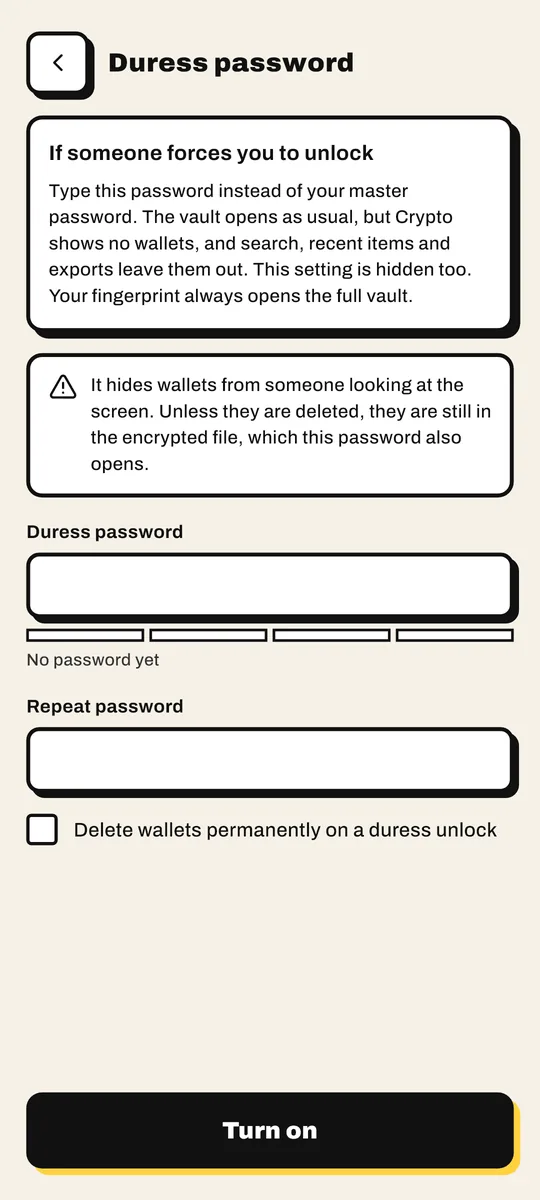
If someone forces you to unlock your phone and your password manager, a normal vault gives them everything. Passbrick Premium lets you set a duress password. Type it instead of your master password and the vault opens as usual, with your crypto wallets hidden, or deleted for good if you set it up that way. Your fingerprint always opens the full vault.

LastPass is built to keep one vault in sync across all your devices and people. It's good at that. It just isn't designed for the person standing next to you.
We'd rather you pick the right tool than the wrong one from us.
If you had a LastPass vault in 2022, switching apps doesn't change the old copy. Change the passwords that were in it, starting with email, banking and crypto.
If you had a LastPass vault in 2022, a copy of it may be in attackers' hands, protected by the master password you had then. Changing your master password now doesn't change that old copy. The safe step is to change the passwords that were stored in it, starting with email, banking and crypto, and to move any seed phrases to new wallets.
Yes. Export a CSV from LastPass and import it in Passbrick. Logins come across with their usernames, passwords, websites and notes, and duplicates are skipped. The file is read on your phone and nothing is uploaded.
Not as of November 2026. A duress password, which opens the vault with your crypto wallets hidden, is one of Passbrick's Premium features.
LastPass has a free plan with unlimited passwords, but it works on one device type only: a computer or a phone, not both. Passbrick is free with no limit on logins, on your Android phone.
No, and it hasn't had an independent audit yet. LastPass isn't open source either. What you can check yourself is that Passbrick has no internet permission: look at App permissions on its Google Play page. The security model lists every algorithm and setting.
Passbrick Premium is $12 a year or $29 once. LastPass Premium is listed at $36 a year and Families at $48 a year for 6 people. Both have a free plan, and Passbrick's free plan includes 2FA codes and the password health check.
Passbrick is free on Google Play. Bring your LastPass export and your vault is ready in a minute.