Bitwarden is one of the best password managers there is, and for most people who need their passwords on several devices, it's the right pick. Passbrick makes a different trade: one phone, no account, no internet permission. Here's an honest look at both, so you can choose.
Bitwarden encrypts your vault on your device before it's uploaded, so Bitwarden's servers only ever hold scrambled data they can't read. That's end-to-end, zero-knowledge encryption, and it's done well. The vault is kept in Bitwarden's cloud (or on your own server, if you self-host) and synced to every device you sign in on. You need a Bitwarden account, and your account's security depends on your master password and two-step login.
Passbrick doesn't have a cloud to upload to. The app ships without Android's internet permission, so it can't connect to anything, not even by mistake. There's no account, no sign-up and no server. The vault is one encrypted file on your phone, and the only copy that ever leaves is an encrypted export you make yourself.
Neither approach is "the secure one". Bitwarden protects data that travels; Passbrick avoids the travel. The cost of Passbrick's choice is real: no sync, and a lost phone without a recent export means a lost vault.
| Passbrick | Bitwarden | |
|---|---|---|
| Storage and access | ||
| Where your vault lives | Only on your phone | Bitwarden's cloud, or your own server |
| Account needed | No | Yes |
| Internet access | None: no internet permission | Needed to sign in and sync |
| Sync between devices | No. Move with an encrypted export | Yes, unlimited devices, free |
| Platforms | Android | Android, iOS, Windows, macOS, Linux, browser extensions, web, command line |
| Forgotten master password | No recovery | No recovery of the vault (a hint and emergency access can help) |
| Everyday features | ||
| Unlimited passwords | Free | Free |
| Autofill on Android | Free | Free |
| Passkeys | Free (Android 14+) | Free |
| Built-in 2FA codes (TOTP) | Free | Premium |
| Password health report | Free | Premium |
| Payment cards | Free | Free |
| Encrypted files and attachments | Premium, up to 500 MB per file | Premium, 5 GB in total |
| Sharing with others | No | Premium shares with one person; Families and business plans share more |
| Emergency access | No | Premium |
| Protection under pressure | ||
| Duress password | Premium | No |
| Crypto wallets with a second lock on seed phrases | Premium | No dedicated type; seed phrases go in a secure note |
| Disguised app icon | Premium (Calculator or Notes) | No |
| Screenshots blocked | Always | Yes, by default on Android |
| Trust | ||
| Open source | No | Yes |
| Independent security audits | Not yet | Yes, regular, with reports published |
| Track record | New, made by one developer | Since 2016, millions of users |
| Price, one person | ||
| Free plan | Yes, no limits on logins | Yes, no limits on passwords or devices |
| Paid plan | $12 a year, $1.50 a month, or $29 once | $19.80 a year |
| Family plan | No | $47.88 a year, up to 6 people |
Bitwarden's plans and prices were checked on 21 November 2026 on bitwarden.com/pricing, in USD, billed yearly. Passbrick's prices are set through Google Play, which shows them in your currency. If something here is out of date, tell us and we'll fix it.
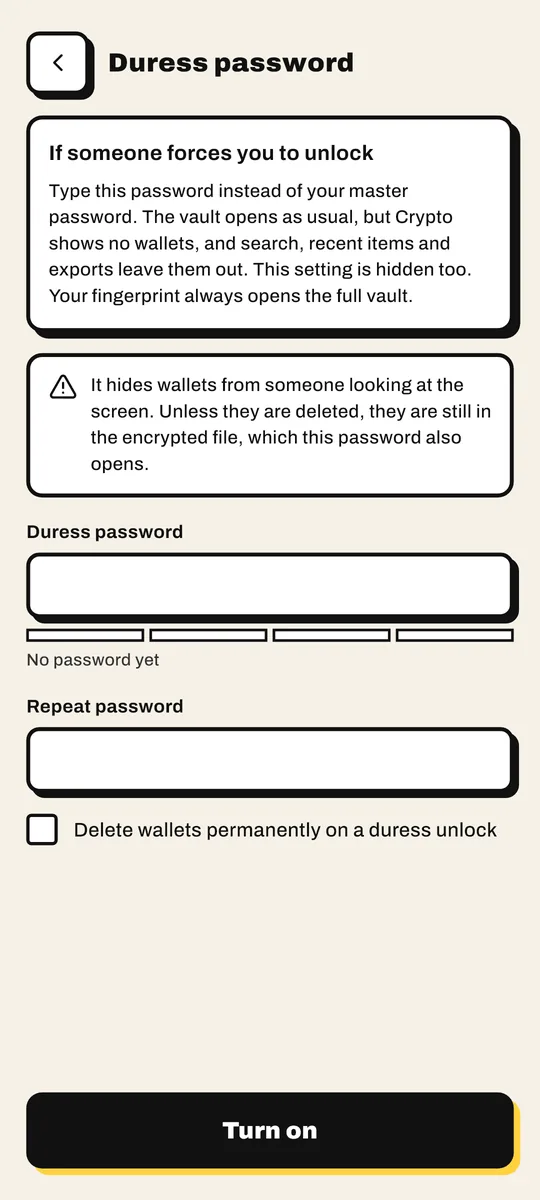
If someone forces you to unlock your phone and your password manager, a normal vault gives them everything. Passbrick Premium lets you set a duress password. Type it instead of your master password and the vault opens as usual, but with your crypto wallets hidden, or deleted if you set it up that way. Your fingerprint always opens the full vault.

Bitwarden is built around a different threat: someone attacking servers and accounts at a distance. It's very good at that. It just isn't designed for the person standing next to you.
We'd rather you pick the right tool than the wrong one from us.
Some people keep both: Bitwarden for everyday logins they need on a computer, Passbrick for seed phrases, documents and anything that should never be online.
Not in every way. Both use strong, modern encryption. Passbrick removes the cloud and the account, so there's nothing to attack remotely and no server to breach. Bitwarden has open source code and independent audits, which Passbrick doesn't have yet. Which matters more depends on what you're protecting against.
Yes. Export a CSV from Bitwarden and import it in Passbrick. Logins come across with their usernames, passwords, websites and notes, and duplicates are skipped.
Bitwarden's apps keep a copy of your vault on the device, so you can usually read it without a connection. But you need an account and an internet connection to set it up and to sync changes. Passbrick never connects at all.
Not as of November 2026. A duress password, which opens the vault with your crypto wallets hidden, is one of Passbrick's Premium features.
No, and it hasn't had an independent audit yet. What you can check yourself is that the app has no internet permission: look at App permissions on its Google Play page. The security model lists every algorithm and setting.
Both have a free plan. Passbrick includes 2FA codes and the password health check for free, which Bitwarden keeps for Premium. Passbrick Premium is $12 a year or $29 once; Bitwarden Premium is $19.80 a year and adds sync-friendly extras like emergency access and sharing.
Passbrick is free on Google Play. Bring your Bitwarden export and your vault is ready in a minute.